
Nail Design Studio
DigiTide BlazeBeauty
4.610.00 Reviews
- Version
- 2.0.0
- Installs
- 50.00K
- Age Rating
- Everyone
Screenshots
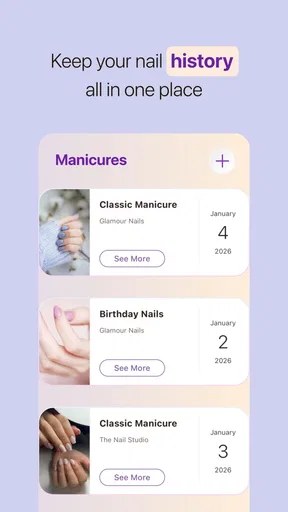
Our Review of Nail Design Studio
 Analysis by Appyee
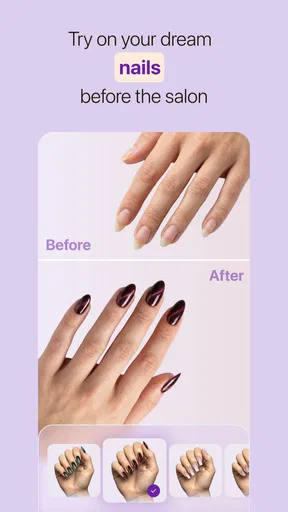
I approached Nail Design Studio as a practical beauty app rather than a simple gallery of manicure pictures. Its main appeal is the chance to think through a nail look, explore ideas, and see how a style might work on your own hand with AI before committing to polish, extensions, or a salon appointment. That makes it more useful than endlessly scrolling through unrelated inspiration, especially when I know I want something specific but cannot quite describe it.
The app comes from DigiTide Blaze and is available free of charge, with optional in-app purchases priced from $3.99 to $29.99 per item. It is listed for everyone, runs on Android devices using version 7.0 or later, and the current release is 1.5.8. Those details make it approachable for a wide range of users, although the paid items are worth keeping in mind before treating every creative option as unlimited.
What interests me most is the combination of design exploration and a try-on experience. A regular manicure inspiration board can show attractive examples, but it leaves me to imagine whether the shape, colors, and decoration suit my own fingers. Here, the more personal workflow is the important distinction: I can start with an idea, test its visual direction, and then decide whether it is worth recreating in real life.
How the app builds confidence before a manicure decision
I find that a virtual manicure preview is most valuable when it helps me make a decision, not just admire another design. In this section, I’ll look at how comparing a few deliberate options can clarify what suits the occasion, my routine, and the look I actually want. That confidence is a starting point; the next section turns to habits that make the choice easier to repeat.
More useful than a static inspiration gallery
Many beauty apps are essentially collections of images. They can be enjoyable, but they often create a familiar problem: I save several designs and still have no clear answer when it is time to choose one. Nail Design Studio is more interesting when I use it as a decision-making tool. Instead of asking only, “Do I like this picture?”, I can ask, “Would I actually want this on my hand?”
That change sounds small, but it affects how I browse. I pay more attention to the relationship between a design and my own style. A dramatic chrome look may be impressive in a close-up image yet feel too bold for work. A detailed pattern may look beautiful but be unrealistic for a quick home manicure. Seeing ideas in a more personal context helps separate admiration from a design I would genuinely wear.
I also found the app better suited to planning than to last-minute browsing. If I have an appointment coming up, I can use it to narrow down the general direction first: soft neutrals, bright seasonal color, French-inspired details, or something more decorative. That gives me a clearer reference when explaining what I want, without pretending that an AI preview replaces a professional consultation.
A realistic everyday workflow
Imagine that I am preparing for a wedding and want nails that look polished in photographs without becoming the center of attention. I might begin with a neutral base, compare a few decorative directions, and use the hand preview to judge whether the result feels balanced. If a design looks too busy, I can simplify the idea before buying products or sending a screenshot to a technician.
For a different situation, such as a weekend trip, I might use the app to test a stronger color that I would not normally choose. The value is not that the app tells me what to wear. The value is that it lowers the cost of experimenting. I can explore a bolder style digitally before spending time removing it or discovering that I dislike it after application.
A useful habit is to treat the preview as a conversation starter, not a promise. Lighting, nail length, skin tone, camera position, polish finish, and the quality of the eventual application all affect the real result. I would use the visual output to communicate a mood and design direction, then make the final judgment with real products or a nail professional.
Trust begins with visible choices
Because the app can work with an image of a real hand, I pay closer attention to user control than I would with an ordinary beauty gallery. The important question is not only whether the result looks convincing, but also whether I understand when I am choosing to provide an image, when I am viewing a generated result, and when an optional feature may require payment.
I prefer using an app like this in deliberate steps. I would first browse the available ideas, then decide whether a personal preview is genuinely useful, and only afterward select any feature that asks for a purchase or an image. That sequence keeps the creative process from turning into an automatic series of taps.
The strongest trust signal here is informed participation: I should know which action I am taking before I share a hand image or spend money. I do not treat the visual quality of an AI result as evidence about privacy or data handling. Those are separate issues, and they deserve separate attention.
What I look for before using a hand photo
When an app involves a personal photo, I take a moment to inspect the screens and choices presented to me. I want to see whether the app clearly indicates when an image is being used for the try-on process, whether I can choose a different image, and whether the result can be discarded without continuing into another action. These small moments affect how comfortable the whole experience feels.
I also avoid uploading more of my surroundings than necessary. A close crop of the hand is preferable to a photograph that includes faces, documents, children, a distinctive home interior, or other unrelated details. This is a simple practical step rather than a claim about how Nail Design Studio processes images. It gives me more control over what I choose to place into an app.
If the app presents a permission request, I read it instead of approving automatically. A permission should make sense for the action I am trying to perform. If I am only browsing manicure ideas, I would not expect to need the same access as when I deliberately select or capture an image for a virtual preview. Keeping those activities separate helps me make a more informed choice.
Account and purchase awareness
Another point I consider is whether an app asks me to create an account before I have had a chance to understand its basic experience. I prefer to explore the free portion first, identify what I can actually use, and then decide whether any account-related step is worthwhile. If an account screen appears, I read the prompts carefully and avoid entering information that is not necessary for the purpose I have in mind.
The free price makes trying the app relatively easy, but the optional purchases change the decision once I move beyond the basic experience. Items range from $3.99 to $29.99, so I would not tap a purchase button casually. I look for the exact item, the amount, and whether the screen clearly distinguishes a one-time purchase from any other billing arrangement. The presence of a price range does not tell me which feature I will want, so I treat each purchase as a separate decision.
This is especially important for younger users. The everyone rating makes the app broadly accessible, but accessibility is not the same as purchase independence. On a shared device, I would keep purchase authentication enabled and make sure the person using the app understands that some creative options may cost extra.
Where the AI preview helps, and where it can mislead
The hand preview is most useful for broad visual questions: does the color feel too strong, does the decoration compete with the overall look, or does the design match the occasion? It is less reliable for technical questions such as whether a particular shape is suitable for my natural nails, how long a set will last, or how difficult a pattern will be to reproduce.
That distinction prevents disappointment. A generated image can make a complicated design appear effortless, while the real version may require specialist tools, multiple layers, careful curing, or a technician’s skill. I would show the concept to a professional and ask what needs to change for my nail length and condition. For home users, I would simplify intricate details rather than assuming the preview represents an easy tutorial.
Color is another area where I stay cautious. Screen brightness and display settings can alter how a shade appears, and real polish has texture and reflectivity that a digital image cannot fully reproduce. I use the app to compare families of color and decoration, then check physical samples or product images before ordering anything.
Useful ways to organize a design decision
One of my favorite ways to use a tool like this is to compare designs by commitment level. I might separate ideas into three groups: something I can recreate quickly, something I would ask a technician to adapt, and something I simply enjoy looking at. This prevents an attractive but impractical design from crowding out options that fit my schedule.
I also think about maintenance before choosing. Pale shades can make small imperfections less noticeable, while elaborate decoration may require more care to keep looking intentional. A design that works for a special event may not suit someone who types all day, works with their hands, or wants low-maintenance nails. The preview helps with appearance, but I still make the lifestyle judgment myself.
Another useful workflow is to create a short reference set rather than saving every idea. I would choose a few candidates with different levels of color and detail, then compare them in the same session. This makes the app a filter instead of another source of endless indecision. The goal is not to collect more images; it is to leave with a design direction I can explain.
Who will appreciate it most
Nail Design Studio is a good fit for someone who enjoys experimenting but wants a more personal view than a standard inspiration feed provides. It should appeal to beginners who struggle to describe a manicure, people preparing for an event, and users who want to test a trend before buying polish or booking a service.
It is also useful for communicating with a nail technician. I would not present the generated result as an exact technical specification, but it can help me point to the color balance, decoration, and overall mood I want. That can make a consultation more efficient, especially when my vocabulary for nail art is limited.
The app may be less satisfying for an experienced nail artist who already has a precise design process and needs detailed technical instructions. A dedicated tutorial platform, professional reference library, or hands-on practice may be better for learning application techniques. Likewise, someone who only wants a basic color recommendation may find a full visual try-on workflow unnecessary.
How it compares with familiar alternatives
Compared with social media boards, this app offers a more focused path from inspiration to personal visualization. Social platforms are usually stronger for discovering creators, techniques, and a huge variety of styles. They are also more distracting. I can spend a long time browsing without making a decision. Nail Design Studio feels more purposeful when I already want to test a look on my own hand.
Compared with a salon consultation, it is faster and more private for early experimentation, but it cannot assess nail health, recommend a safe length, or guarantee that a digital effect can be reproduced. A technician remains the better option for technical judgment and execution. I see the app as preparation for that conversation, not a replacement for it.
Compared with trying polish directly, the app reduces waste and cleanup during the idea stage. However, physical testing remains superior for texture, opacity, drying behavior, and the way a shade reacts to real lighting. If I am choosing between two nearly identical colors, a real swatch is more dependable than a screen preview.
Performance expectations and practical friction
The app’s current version is 1.5.8, and its Android compatibility reaches back to version 7.0, which makes it accessible on many older devices. Even so, AI-based visual work can feel more demanding than opening a simple image gallery. I would keep the device updated, use a clear image, and allow a little patience when a result needs processing rather than assuming every preview will appear instantly.
Image quality matters more than many first-time users expect. A poorly lit hand photo, unusual angle, or partially hidden nail can make a design preview less useful. I would photograph the hand in even light, keep the nails visible, and avoid distracting backgrounds. This is one of the easiest ways to improve the usefulness of the output without spending anything.
I also keep expectations realistic around consistency. If I am comparing styles, I try to use similar photos and conditions so that the difference comes from the design rather than from changes in framing. That makes side-by-side judgment fairer and helps me avoid rejecting a good idea simply because one preview was less flattering.
Privacy-minded habits that improve the experience
My approach is simple: browse first, share selectively, and review every purchase screen. I would use the app’s creative features only when I have a clear purpose, rather than uploading personal images just to see what happens. If I no longer need a generated result, I would remove it from the device or app interface when a visible deletion option is available.
I would also avoid assuming that a free download means every part of the experience is free, or that an AI preview automatically means a photo is handled in a particular way. Those assumptions are easy to make and difficult to reverse. The safer habit is to read the app’s visible prompts and privacy choices at the moment they appear, then decide based on what I can understand.
For families, I would explain the difference between browsing and trying on. A child can enjoy exploring manicure ideas without needing access to personal photos or purchase controls. Keeping those activities distinct gives the user more agency and reduces accidental actions on a shared phone.
My measured verdict
Nail Design Studio stands out because it tries to answer the question that ordinary manicure galleries leave unresolved: how might this idea feel on me? The AI hand preview gives the app a practical role in choosing a look, preparing for a salon visit, or experimenting with a trend without immediately committing to products.
Its limitations are just as important. A digital result cannot promise an exact real-world match, teach every application technique, or replace professional advice about nail condition and durability. Optional purchases also mean I would explore carefully before deciding whether the paid additions justify their cost. The app works best when I use it as a visual planning aid rather than an authority.
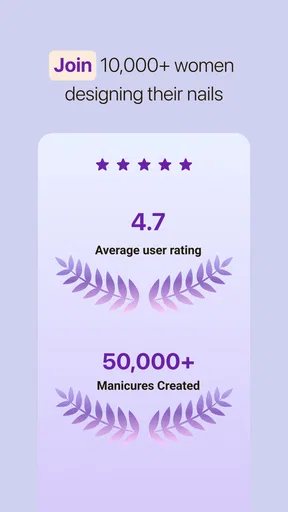
With a 4.7 average from around 190 ratings and more than 10 thousand installs, it has attracted a modest but positive audience. I would read those figures as encouraging interest, not as proof that it will suit every phone, hand photo, or beauty routine. The developer is DigiTide Blaze, and the app’s everyone rating makes it easy to consider for casual household use, provided purchase controls remain clear.
My recommendation is cautious but positive: try it if you want to make manicure choices more personal and you are comfortable treating AI previews as approximations. Start with free browsing, use a tightly cropped and well-lit image, inspect permissions and account prompts, and pause before any optional purchase. If your priority is professional nail education, exact product matching, or technical salon guidance, choose a specialist alternative instead. For visual experimentation and clearer conversations about style, Nail Design Studio is a worthwhile tool when used with realistic expectations.
Privacy and Permissions
See what permissions an app requests and how it handles your data.
- Photos/Media/Files
- read the contents of your USB storage, modify or delete the contents of your USB storage
- Storage
- read the contents of your USB storage, modify or delete the contents of your USB storage
- Camera
- take pictures and videos
- Microphone
- record audio
- Other
- view network connections, full network access, run at startup, draw over other apps, control vibration, prevent device from sleeping, Google Play license check
Verdict
Strengths of Nail Design Studio
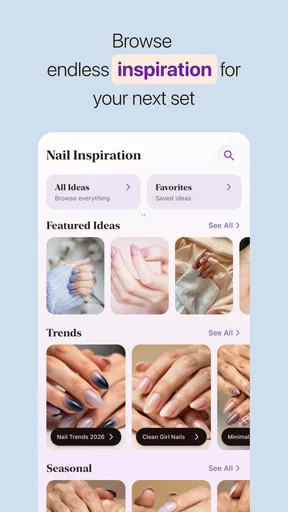
- Large library of nail art ideas for different styles and occasions.
- Simple tools make it easy to experiment with colors and patterns.
- Useful for planning a manicure before visiting a salon.
- Inspiration can be saved for quick access later.
- Suitable for beginners exploring nail design creatively.
Limitations of Nail Design Studio
- Some designs or features may require in-app purchases.
- The app may feel limited without regular content updates.
- Detailed designs can be difficult to recreate on real nails.
- Results depend on your device’s screen size and performance.
- May include advertisements that interrupt the browsing experience.
Similar Picks in This Category
View All
Beauty Makeup Editor & Camera
Photo & Video Editors - Instant Solution4.7

Perfect365: Face Makeup Editor
Perfect365, Inc.3.5

Mirror Plus - HD Mirror app
Digitalchemy, LLC4.8

Cute Lock Screen & Wallpapers
Prometheus Interactive LLC4.6

HD Camera for Android
One Music Player4.5

Phone Mirror app - True Mirror
Cards4.6
Frequently Asked Questions
What is Nail Design Studio and what can I do with it?
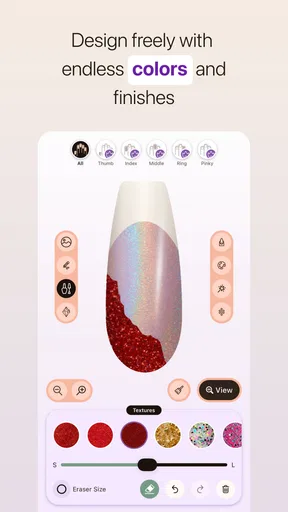
Nail Design Studio is a creative nail-art application designed for users who want to experiment with manicure ideas digitally. After exploring the app, you can create or customize nail designs using different colors, patterns, decorations, shapes, and finishes. It is useful for planning a manicure, finding inspiration, or simply trying combinations before applying them in real life.
Is Nail Design Studio suitable for beginners without nail-art experience?
Yes, Nail Design Studio is generally approachable for beginners because it lets you experiment without requiring professional manicure skills. The visual design tools make it possible to test colors, styles, and decorative elements at your own pace. More experienced users may also enjoy the creative freedom, although the available options and editing controls can vary depending on the app version and device.
Does Nail Design Studio include real nail-care or professional salon instructions?
Nail Design Studio is primarily focused on visual creativity and design planning rather than replacing professional nail-care advice. It can help you imagine how a manicure might look, but it should not be treated as a medical, hygiene, or salon-training application. Users should still follow proper nail-care practices and consult a qualified professional if they have concerns about nail health or allergies.
Can I save or share the nail designs created in the app?
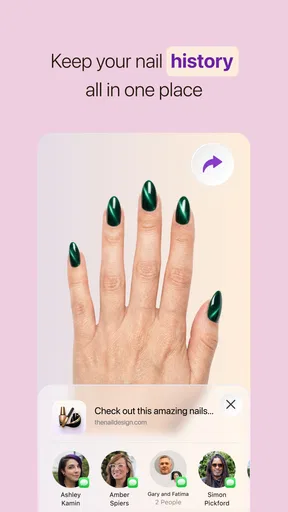
The app is intended to make it easy to review and present your nail-art ideas, and supported versions may offer options for saving designs or sharing them with friends. However, the exact export and sharing features can depend on the operating system, app version, and device permissions. Before creating a large collection, check whether the version you download supports image saving, screenshots, or direct sharing.
Is Nail Design Studio free to download, and are there advertisements or in-app purchases?
Nail Design Studio may be available as a free download, but users should carefully review the store listing because pricing, advertising, and optional purchases can change over time. Some versions may restrict particular designs, tools, or content behind advertisements or in-app purchases. Checking the permissions, subscription details, and purchase information before downloading will help avoid unexpected costs.
